Rule Templates
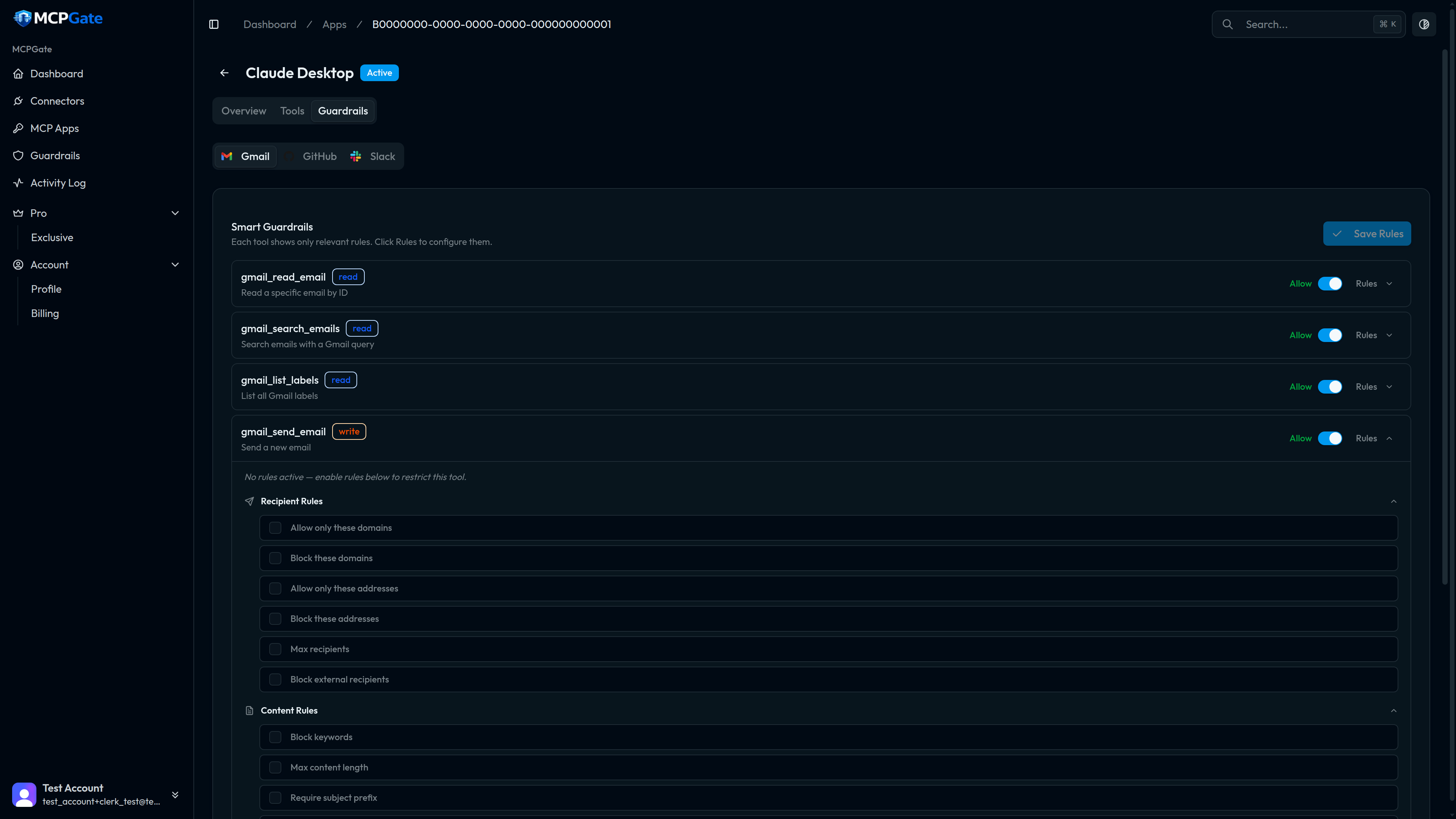
MCPGate ships 33 built-in rule templates organised into 9 categories. Each template is configured with a JSON object — the fields and an example are shown for every template below.
To attach a template to a tool, go to your App → Guardrails tab → click Add Rule on the tool you want to constrain. Select the template type and fill in the configuration.
Text & Content#
keyword_blockDeny tool calls whose string parameters contain any of the specified keywords.
keywords: string[]
{"keywords": ["confidential", "internal", "secret"]}content_lengthEnforce a maximum character length on string parameters.
max_length: number, field?: string
{"max_length": 2000}require_prefixRequire that a specific string field begins with a given prefix.
field: string, prefix: string
{"field": "subject", "prefix": "[AI]"}block_patternDeny tool calls whose parameters match a regular expression.
pattern: string, field?: string
{"pattern": "\\b(password|passwd|pwd)\\b", "field": "body"}Email#
allow_domainsAllow email addresses only from specified domains. Deny all others.
domains: string[]
{"domains": ["yourcompany.com", "partner.com"]}block_domainsBlock email addresses from specified domains.
domains: string[]
{"domains": ["competitor.com", "spam-domain.net"]}allow_addressesAllow only specific email addresses in recipient fields.
addresses: string[]
{"addresses": ["[email protected]", "[email protected]"]}block_addressesBlock specific email addresses from being used as recipients.
addresses: string[]
{"addresses": ["[email protected]", "[email protected]"]}max_recipientsLimit the maximum number of recipients in a single email.
max: number
{"max": 5}block_externalBlock all email addresses that are not in your connected Google Workspace domain.
none — uses the domain from the connected account
{}Values & Access#
allow_valuesAllow only specific values for a named parameter field.
field: string, values: string[]
{"field": "channel", "values": ["C01234", "C05678"]}block_valuesBlock specific values for a named parameter field.
field: string, values: string[]
{"field": "status", "values": ["published", "live"]}protect_valuesRedact or mask a specific field in tool call arguments before logging.
field: string
{"field": "password"}protect_labelsPrevent adding or removing specific Gmail labels.
labels: string[]
{"labels": ["IMPORTANT", "STARRED"]}Data Protection#
pii_detectionBlock tool calls that contain personal identifiable information of specified types.
types: string[] — options: email, phone_us, ssn, creditcard, ip_address
{"types": ["email", "phone_us", "ssn", "creditcard"]}block_secretsBlock tool calls that appear to contain API keys, tokens, or other secrets based on pattern matching.
none — uses built-in secret patterns
{}Deletion#
block_deleteDeny all calls to this tool unconditionally. Use on delete-category tools to prevent any deletion.
none
{}protect_ageBlock deletion of items newer than a specified age in days.
min_age_days: number
{"min_age_days": 30}Messaging#
block_mass_mentionsBlock Slack messages containing @channel, @here, or @everyone.
none — blocks all mass mention patterns
{}block_linksBlock tool calls whose string parameters contain HTTP/HTTPS URLs.
none
{}allow_link_domainsAllow URLs only from specified domains. Block all other links.
domains: string[]
{"domains": ["docs.yourcompany.com", "github.com"]}Files#
allow_foldersAllow file operations only within specified folder paths.
paths: string[]
{"paths": ["/AI-Workspace", "/Shared/AI"]}block_foldersBlock file operations in specified folder paths.
paths: string[]
{"paths": ["/Finance", "/HR", "/Legal"]}allow_file_typesAllow only specified file extensions in upload or create operations.
extensions: string[]
{"extensions": [".txt", ".md", ".csv"]}block_file_typesBlock specified file extensions in upload or create operations.
extensions: string[]
{"extensions": [".exe", ".sh", ".bat", ".ps1"]}block_overwriteBlock operations that would overwrite an existing file.
none
{}Repos#
allow_reposAllow operations only on specified repositories (owner/repo format).
repos: string[]
{"repos": ["myorg/frontend", "myorg/backend"]}block_reposBlock operations on specified repositories.
repos: string[]
{"repos": ["myorg/infra", "myorg/secrets"]}protect_branchesBlock PR creation or pushes targeting specified branch names.
branches: string[]
{"branches": ["main", "production", "release"]}require_labelsRequire that issues or PRs include at least one label from a specified set.
labels: string[]
{"labels": ["bug", "feature", "chore"]}force_draftOverride the draft parameter to true on all PR creation calls.
none
{}Time & Rate#
time_windowAllow tool calls only within specified hours (24h format, UTC).
start_hour: number, end_hour: number, timezone?: string
{"start_hour": 9, "end_hour": 17, "timezone": "America/New_York"}cooldownEnforce a minimum time between calls to this tool.
seconds: number
{"seconds": 60}